
The Oppo S39 was already an older MP4 player when the original post was written, but it still made sense as a dedicated video and music device that did not drain the phone battery.
What you need
- The `S39_10.b08.img` ROM file
- The `RK28Upgrade` flashing utility for Windows
- A full backup if moving from a 9.x ROM to 10.x
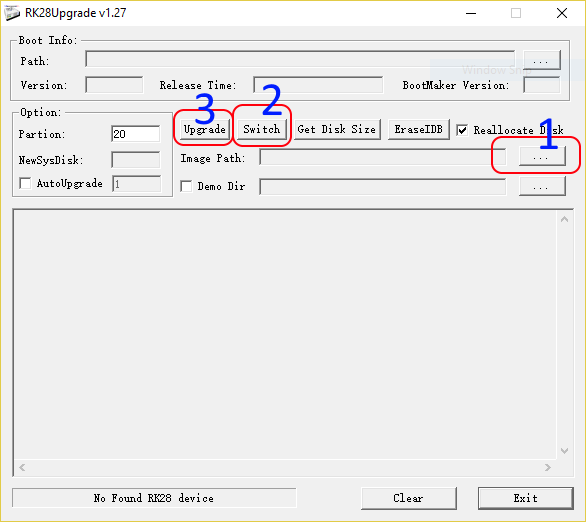
Update process
- Run `RK28Upgrade` as administrator
- Connect the Oppo S39 to the PC while it shows the USB icon
- Load the ROM using button `1`
- Press `Switch` using button `2`
- When Windows asks for drivers, point it to the `Driver` folder in the RK28Upgrade directory
- Once the device is shown as connected, press `Update` using button `3`
- Wait for the process to complete and accept the formatting prompt
- After reboot, change language from settings if needed
The key warning from the original post still stands: when crossing from ROM 9.x to 10.x,
back up everything first because the internal storage will be formatted.